
Tips for Creating a Cozy and Productive Home Office Space
hetupey.pro >> Home Office>>Productivity>> Tips for Creating a Cozy and Productive Home Office Space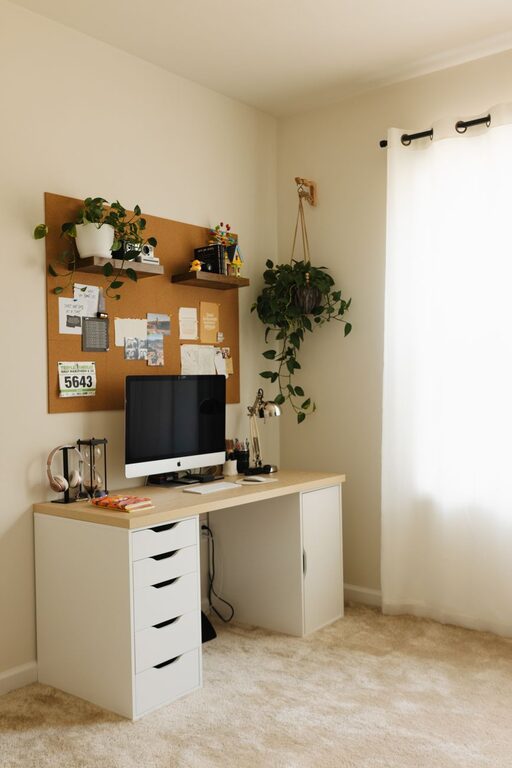
Tips for Creating a Cozy and Productive Home Office Space
Creating a cozy and productive home office space is essential for anyone working remotely or spending significant time on tasks at home. A thoughtfully designed workspace can boost focus, reduce stress, and make your workday more enjoyable. Whether you have a dedicated room or a small corner, these tips will help you transform your home office into a place where comfort meets efficiency.
Choose the Right Location
Selecting the best spot for your home office is the first step. Ideally, find a quiet area that minimizes distractions and allows you to focus.
– Natural Light: Position your desk near a window to take advantage of natural light. Natural light can improve mood and reduce eye strain.
– Away from Noise: Choose a space away from loud household areas like the kitchen or living room.
– Space for Movement: Ensure there is enough room for your chair and to move comfortably.
Invest in Comfortable and Functional Furniture
Your furniture is the foundation of your home office’s comfort and productivity.
– Ergonomic Chair: A chair that supports your back and encourages good posture is crucial for long hours at your desk.
– Desk Size: Pick a desk large enough to hold your computer, necessary supplies, and allow for writing or other tasks.
– Storage Solutions: Use shelves, filing cabinets, or organizers to keep your workspace tidy and reduce clutter.
Optimize Lighting
Proper lighting can reduce eye fatigue and create a warm, inviting workspace.
– Layered Lighting: Combine natural light with overhead lights and a desk lamp to avoid harsh shadows.
– Adjustable Desk Lamp: Choose a lamp with adjustable brightness to suit different times of the day.
– Soft White Bulbs: These create a warm atmosphere without being too harsh or too dim.
Personalize Your Space
Adding personal touches helps make your office feel cozy and uniquely yours.
– Plants: Small indoor plants can improve air quality and add a touch of nature.
– Artwork and Photos: Display images that inspire or motivate you.
– Decor: Use rugs, cushions, or curtains in colors you enjoy to create a welcoming vibe.
Minimize Clutter and Stay Organized
An organized workspace supports productivity and peace of mind.
– Declutter Regularly: Keep only essentials on your desk and store the rest.
– Cable Management: Use clips or sleeves to keep cords tidy and out of the way.
– Daily Reset: Spend 5 minutes at the end of your day tidying up your workspace.
Use Technology Wisely
Having the right technology setup can streamline your work.
– Reliable Internet: Ensure you have a strong internet connection.
– Quality Monitor: A good-sized monitor can reduce eye strain and improve multitasking.
– Headphones: Noise-cancelling headphones can help block distractions.
Establish Boundaries and Routine
Creating a routine and setting limits helps separate work time from personal time.
– Work Hours: Define specific start and end times for your workday.
– Breaks: Schedule short breaks to stretch or walk around.
– Dedicated Workspace: Use your office area exclusively for work to maintain focus.
Keep Comfort in Mind
Small comfort tweaks can make a big difference in how pleasant your workday feels.
– Temperature Control: Use a fan, heater, or air purifier as needed to stay comfortable.
– Comfortable Flooring: Consider a soft rug or cushioned mat if you spend time standing.
– Hydration and Snacks: Keep water and healthy snacks nearby to stay energized.
—
Designing a home office that’s cozy and productive doesn’t have to be complicated or expensive. By focusing on comfort, organization, and personalization, you’ll create a space that not only supports your tasks but also feels good to spend time in. With these tips, your home office will become a place where productivity and coziness go hand in hand.